
Professional online drawing board with multiple brush types (pencil, pen, marker, brush, spray), undo/redo, color palette, and save functionality. Perfect for digital art, sketching, and creative design.
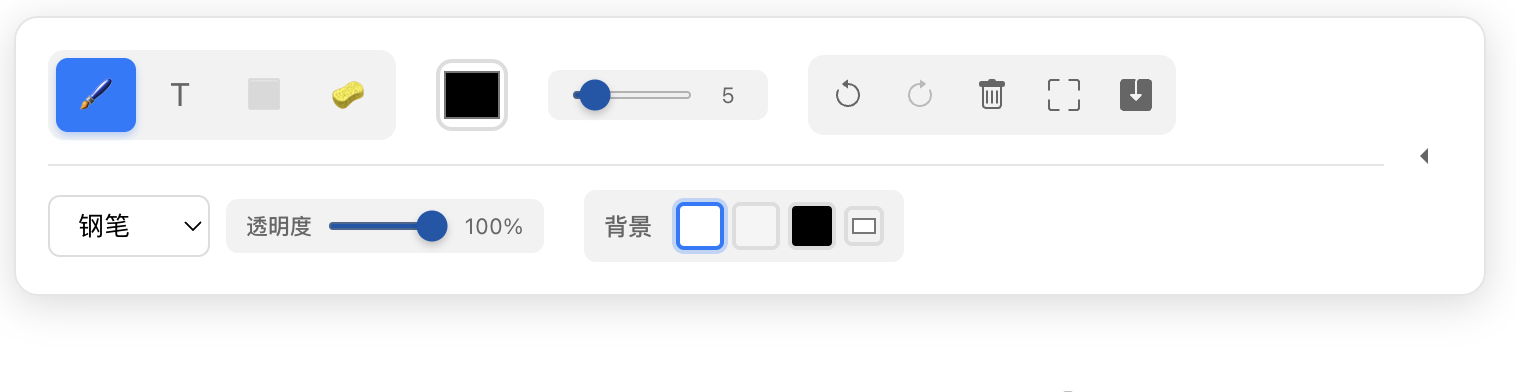
Online Drawing Board | Free Digital Sketch Pad, Multi-Brush Art Tool, Canvas Drawing
🎨 Professional Online Drawing Board
Create stunning digital artwork with our feature-rich online drawing board. Whether you're a professional artist, designer, or just love to sketch, our tool provides everything you need for digital creativity.
✨ Key Features
🖌️ Multiple Brush Types
- Pencil: Fine texture with natural pencil-like strokes
- Pen: Sharp, clean lines perfect for technical drawings
- Marker: Wide, translucent strokes with blending effects
- Brush: Pressure-sensitive with soft shadows and artistic feel
- Spray: Airbrush effect with gradient transparency
🎨 Advanced Drawing Tools
- Color Palette: 15 preset colors plus custom color picker
- Brush Size: Adjustable from 1px to 100px
- Opacity Control: Fine-tune transparency from 10% to 100%
- Background Colors: Customizable canvas background
- Eraser Tool: Variable size eraser for corrections
Best use cases
Online Drawing Board is most useful when the task is clear, repetitive, and time-sensitive. Instead of opening a large desktop application or switching between multiple services, you can handle the immediate job in one browser tab and move on with the rest of your workflow.
This kind of page is especially useful for quick conversions, lightweight content operations, validation, and privacy-sensitive work where local processing or minimal setup is an advantage. Use the related pages below when the current task leads into export, preview, cleanup, or a second transformation step.
The practical question is not whether the page can do everything, but whether it removes enough friction from the job in front of you. If the answer is yes, it deserves a place in your everyday toolkit; if one step is still missing, the follow-up links below help you bridge that gap without leaving the site.
What usually separates a useful tool page from a forgettable one is repeatability. If you can return to the page next week, remember the workflow instantly, and finish the task with minimal setup, the page is doing its job. That is the standard these related pages try to support together.
Related reading
- Remove Image Background Online (Free, No Signup): Remove image backgrounds instantly in your browser using AI. 100% free, no upload, privacy-safe. Download transparent PNG for e-commerce, profile photos, and design.
- Free Online Markdown to PDF Converter - Live Preview & Export: Convert Markdown to PDF online for free with real-time preview. Professional document converter with syntax highlighting, responsive design, and instant PDF export. No registration required - start converting now!
- Code to Image - Free Online Code Screenshot Generator: Transform your code into beautiful, shareable images with syntax highlighting. Support for 50+ programming languages, multiple themes, and customizable styling. Perfect for social media, documentation, and presentations.
What to open next
- Browse the full tool directory: place this page back inside a larger collection or reading path instead of ending the session here.
- Remove Image Background Online (Free, No Signup): Remove image backgrounds instantly in your browser using AI. 100% free, no upload, privacy-safe. Download transparent PNG for e-commerce, profile photos, and design.
- Free Online Markdown to PDF Converter - Live Preview & Export: Convert Markdown to PDF online for free with real-time preview. Professional document converter with syntax highlighting, responsive design, and instant PDF export. No registration required - start converting now!
- Code to Image - Free Online Code Screenshot Generator: Transform your code into beautiful, shareable images with syntax highlighting. Support for 50+ programming languages, multiple themes, and customizable styling. Perfect for social media, documentation, and presentations.
- Bookmark the homepage: keep the workspace one click away so new additions are easy to revisit.
- Subscribe by RSS: RSS is the cleanest return channel here if you want updates without email capture.
- Suggest a tool or topic: send the next gap you want this site to cover.