
Claude Code with Ollama - Local AI Coding Assistant Setup Guide
Claude Code with Ollama: Local AI Coding Assistant Setup Guide
Master Claude Code with Ollama integration for privacy-focused, local AI-powered coding assistance. Learn to set up Anthropic's agentic coding tool with open-source models like GLM-4.7, Qwen3-Coder, and GPT-OSS.
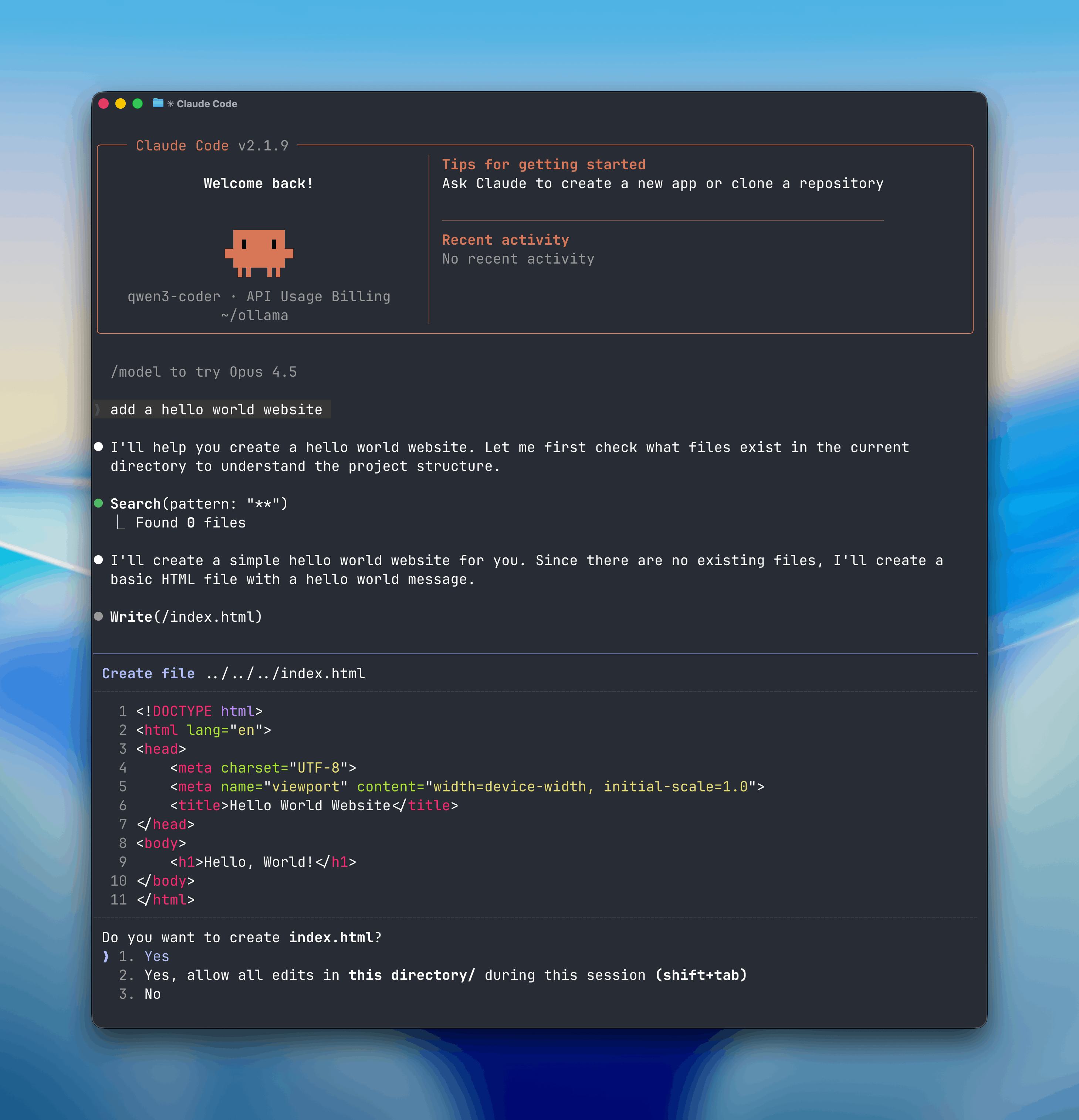
What is Claude Code with Ollama?
Claude Code is Anthropic's powerful agentic coding tool that enables AI-assisted development directly in your terminal. By integrating with Ollama's Anthropic-compatible API, you can use Claude Code with locally-hosted open-source models, providing privacy, cost-effectiveness, and offline capabilities while maintaining the familiar Claude Code interface and functionality.
Key Benefits
- Privacy-First Development: Keep your code and conversations local
- Cost-Effective: No API costs for local model inference
- Offline Capability: Work without internet connectivity
- Large Context Windows: Support for extensive codebases
- Familiar Interface: Same Claude Code experience with local models
Installation
Prerequisites
Before installing Claude Code, ensure you have:
- Node.js (version 18 or higher)
- Ollama installed and running locally
- At least one compatible model downloaded
Install Claude Code
npm install -g @anthropic-ai/claude-codeFor detailed installation instructions, visit the official Claude Code documentation.
Ollama Setup for Claude Code
Quick Start Setup
The fastest way to get started is using Ollama's built-in Claude Code launcher:
ollama launch claudeThis command will:
- Check for Claude Code installation
- Configure the necessary environment variables
- Launch Claude Code with your default Ollama model
To configure without launching:
ollama launch claude --configManual Configuration
For more control over your setup, configure Claude Code manually to connect to Ollama's Anthropic-compatible API.
1. Environment Variables Setup
Set the following environment variables in your shell profile (.bashrc, .zshrc, etc.):
export ANTHROPIC_AUTH_TOKEN=ollama
export ANTHROPIC_API_KEY=""
export ANTHROPIC_BASE_URL=http://localhost:11434
Or set them temporarily for a single session:
ANTHROPIC_AUTH_TOKEN=ollama ANTHROPIC_API_KEY="" ANTHROPIC_BASE_URL=http://localhost:114342. Launch Claude Code
Start Claude Code with your preferred Ollama model:
claude --model qwen3-coderOr run with inline environment variables:
ANTHROPIC_AUTH_TOKEN=ollama ANTHROPIC_BASE_URL=http://localhost:11434 ANTHROPIC_API_KEY="" claude --model glm-4.7Recommended Models
Choose from these high-quality coding models optimized for Claude Code:
Best for General Coding
qwen3-coder- Alibaba's specialized coding model with excellent code generationglm-4.7- Tsinghua University's GLM-4 model, strong in code understanding
Best for Large Codebases
gpt-oss:20b- 20B parameter model with large context windowgpt-oss:120b- Maximum context and reasoning capabilities
Cloud Models (Alternative)
Cloud-hosted models are also available through Ollama at ollama.com/search?c=cloud.
Context Window Configuration
Claude Code performs best with large context windows for understanding complex codebases. Configure your model's context length in Ollama:
# Check current context length
ollama show <model-name>

# Adjust context length (example for 128k tokens)
ollama run <model-name> --context-length 131072Recommendation: Use at least 64k tokens for optimal Claude Code performance. Refer to the Ollama context length documentation for detailed configuration options.
Usage Examples
Basic Code Analysis
claude "analyze this Python file and suggest improvements"Code Generation
claude "create a React component for user authentication"Debugging Assistance
claude "help me debug this TypeScript error"Refactoring Tasks
claude "refactor this function to use async/await"Troubleshooting
Common Issues
Connection Refused Error
Error: connect ECONNREFUSED 127.0.0.1:11434Solution: Ensure Ollama is running with ollama serve
Model Not Found Error
Error: model not foundSolution: Pull the model first with ollama pull <model-name>
Context Window Too Small
Error: context window exceededSolution: Use a model with larger context or adjust context settings
Performance Optimization
- Use SSD Storage: Local models perform better on fast storage
- GPU Acceleration: Enable GPU support in Ollama for faster inference
- Model Selection: Choose appropriately sized models for your hardware
- Context Management: Limit context to relevant files when possible
Advanced Configuration
Custom Base URL
If Ollama is running on a different port or host:
export ANTHROPIC_BASE_URL=http://localhost:8080Multiple Model Support
Switch between different models in the same session:
claude --model qwen3-coder
# Later in the same session
/model glm-4.7
Integration with Development Workflows
Combine Claude Code with your existing tools:
# Use with git
claude "review these changes before committing"

# Code formatting
claude "format this code according to our style guide"

# Testing assistance
claude "write unit tests for this function"
Security Considerations
- Local Execution: All code analysis happens locally - no data sent to external servers
- API Key Management: Use empty API key for local Ollama authentication
- Network Isolation: Perfect for air-gapped environments
- Code Privacy: Your proprietary code never leaves your machine
Getting Help
Start coding with AI assistance today - combine the power of Claude Code's interface with the privacy of local Ollama models!