Combining Google Agent and Claude Code platforms to extract a universal, migratable, and practical AI Agent Skill creation methodology. Master the core principles of Skill design and create cross-platform reusable AI skill modules from scratch.
Agent Skill
Core Concepts: What Are Agent Skills?
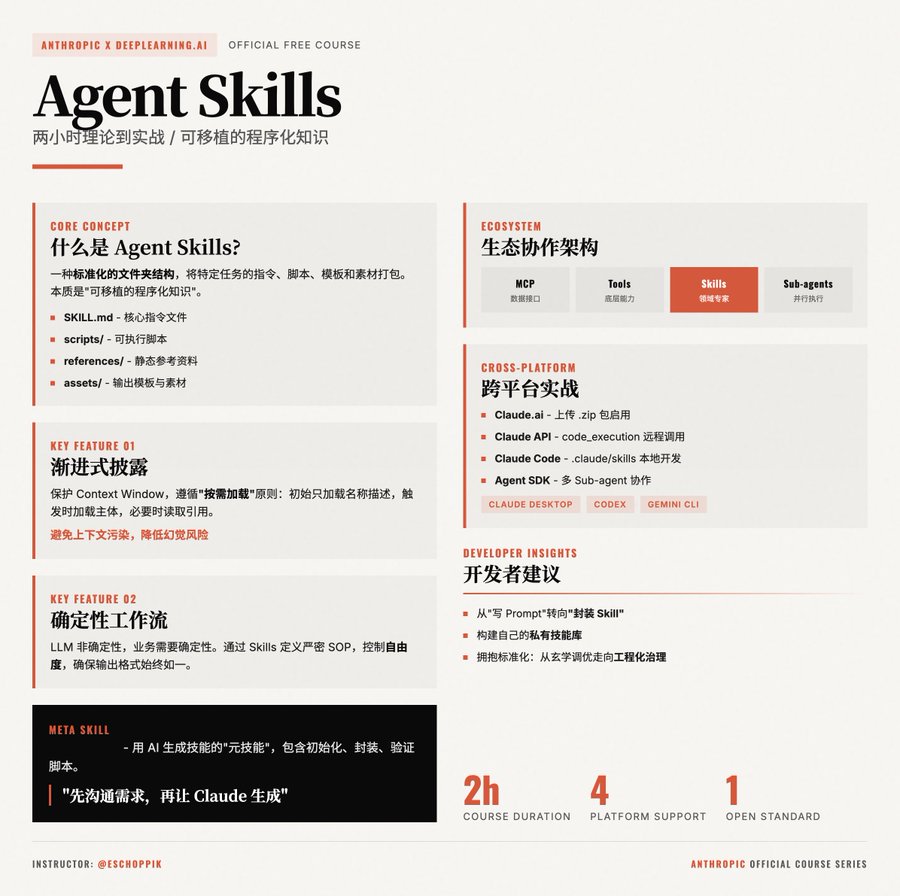
Agent Skills are standardized folder structures that bundle instructions, scripts, templates, and assets for specific tasks. At their core, they represent portable, programmatic knowledge.
Standard Components
SKILL.md: The core file containing YAML metadata (name, description) and detailed instructions in Markdownscripts/: Executable scripts (Python, Bash, etc.) for handling complex logicreferences/: Static reference materials or documentationassets/: Output templates (LaTeX, HTML), images, or logos
Open Standard
A Skill you write can run seamlessly across Claude.ai, Claude Desktop, Claude Code, Claude Agent SDK, and even Codex, Gemini CLI, or any other platform that supports this standard.
Key Technical Features
Let's explore why Skills are more efficient than long prompts:
1. Progressive Disclosure
To protect the precious Context Window, Skills follow a load-on-demand principle:
| State | Description |
|---|---|
| Initial | The model only loads the Skill's name and description |
| Triggered | When user intent matches the description, the model loads the main SKILL.md content |
| Deep Load | Only when necessary does the model read reference files or execute scripts |
This prevents context pollution and significantly reduces hallucination risks in long conversations.
2. Deterministic Workflows
While LLMs are non-deterministic, business logic often requires consistency. With Skills, you can define strict SOPs:
- Low vs. High Freedom: You can force the model to follow step-by-step instructions (Step 1, Step 2...) ensuring output formats (like specific CSV structures or PPT styles) remain consistent every time
Ecosystem: Skills, MCP, and Sub-agents
| Component | Role | Function |
|---|---|---|
| MCP | Data Interface | Connects to external data sources (BigQuery, Notion, Google Drive) |
| Tools | Building Blocks | Provides foundational capabilities (Bash execution, file I/O) |
| Skills | Domain Experts | Guide the model on "how to use tools" for specific tasks (e.g., brand analysis) |
| Sub-agents | Parallel Execution | Independent execution units with their own context, assignable specific skills |
Essential Tool: Skill Creator
The course highlights skill-creator — a "meta-skill" that uses AI to generate skills.
- It includes Python scripts for initializing Skill structures, packaging files, and validation
- Best Practice: Don't start from scratch with Markdown. Discuss your needs with Claude first, then let it invoke skill-creator to generate production-ready Skills
Cross-Platform Implementation
Here's how Skills perform across different environments:
| Platform | Use Case |
|---|---|
| Claude.ai | Upload a .zip package to enable the web version to handle specific report formats |
| Claude API | Remote Skill invocation via API with code_execution preview capabilities |
| Claude Code | Automate development workflows (code reviews, test generation) via the .claude/skills directory |
| Agent SDK | Build complex applications like "Research Assistants" where a main agent coordinates Sub-agents with specialized skills (Search, Repo Analysis, Document Reading) |
Developer Takeaways
- Shift from "Writing Prompts" to "Packaging Skills": If you find yourself typing the same repetitive instructions, it's time to package them into a Skill
- Build Your Private Skill Library: Create domain-specific skills for your business — like "Architecture Review" or "React Component Refactoring" — and migrate them quickly across projects
- Embrace Standardization: Agent Skills mark the evolution of agent development from "prompt tinkering" to engineering governance
了解更多 Skills →
更多模板 →
DeepLearning.AI Agent Skills Course →
Related reading
- Claude Skills vs MCP: A New Paradigm for AI Development Collaboration: Deep dive into Anthropic Claude's Skills system and MCP (Model Context Protocol), exploring the technical evolution of AI agents from "talking" to "doing", and how they collaborate to build enterprise-grade AI development ecosystems.
- Complete MCP Protocol Guide: 12 Core AI Agent Development Frameworks Deep Analysis: In-depth analysis of MCP (Model Context Protocol) and 12 core development frameworks, including OpenAI SDK, Python SDK, TypeScript SDK with complete code examples. Help you quickly build AI agent applications.
- Steps to Develop an AI Agent: AI Agent, Core Thinking Patterns, Large Language Models (LLMs)
What to open next
- Continue with the guide tracks: place this page back inside a larger collection or reading path instead of ending the session here.
- Claude Skills vs MCP: A New Paradigm for AI Development Collaboration: Deep dive into Anthropic Claude's Skills system and MCP (Model Context Protocol), exploring the technical evolution of AI agents from "talking" to "doing", and how they collaborate to build enterprise-grade AI development ecosystems.
- Complete MCP Protocol Guide: 12 Core AI Agent Development Frameworks Deep Analysis: In-depth analysis of MCP (Model Context Protocol) and 12 core development frameworks, including OpenAI SDK, Python SDK, TypeScript SDK with complete code examples. Help you quickly build AI agent applications.
- Steps to Develop an AI Agent: AI Agent, Core Thinking Patterns, Large Language Models (LLMs)
- Bookmark the homepage: keep the workspace one click away so new additions are easy to revisit.
- Subscribe by RSS: RSS is the cleanest return channel here if you want updates without email capture.
- Suggest a tool or topic: send the next gap you want this site to cover.