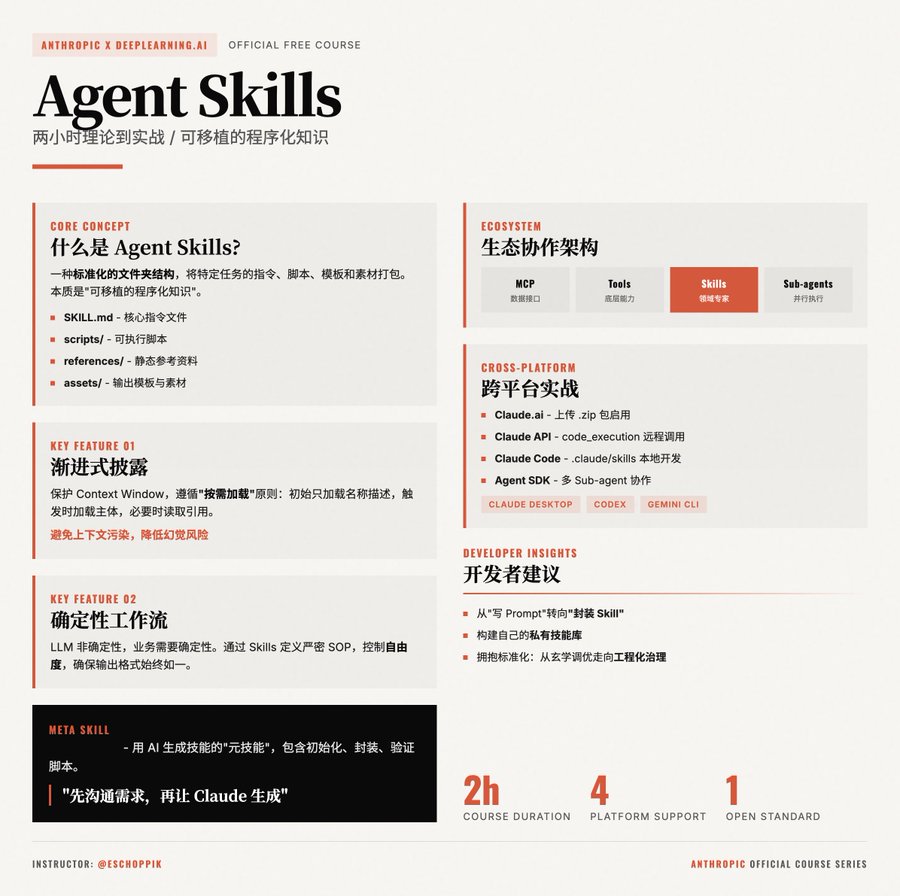
Agent Skill 实战指南:一次编写,多平台复用(Google Agent × Claude Code)
如果说 Agent 是「会思考的调度器」,那么 Skill 就是 Agent 真正"能干活"的能力单元。
Google Agent(Antigravity)和 Claude Code 虽然来自不同厂商,但在 Skill 设计理念上高度一致:
用结构化的指令文档,把可重复的工作流程固化为 AI 能力模块。
本文将结合两套官方文档,提炼一套通用、可迁移、可实践的 Skill 创作方法论。
一、统一认知:什么是 Agent Skill(工程定义)
抛开平台差异,Skill 的本质只有一句话:
Skill = 面向 Agent 的标准作业流程(SOP)说明书
它不是代码函数,也不是 Prompt,而是:
- 明确 什么时候该用
- 规定 怎么一步步做
- 约束 输出的形式与质量
Google 和 Claude 在实现上几乎完全一致:
| 维度 | Google Agent | Claude Code |
|---|---|---|
| Skill 载体 | SKILL.md | SKILL.md |
| 激活方式 | 自主匹配 description | 自主匹配 description |
| 执行模型 | 读取 → 遵循 → 执行 | 读取 → 遵循 → 执行 |
| 是否显式调用 | 否 | 否 |
结论:
Skill 是“给 AI 看的工程文档”,不是给人看的说明书。
二、Skill 的最小结构(跨平台通用)
一个可工作的 Skill,只需要一个文件:
my-skill/
└── SKILL.mdSKILL.md 的固定结构
---
name: skill-name
description: 清晰描述什么时候使用这个 skill
---
# Skill Title
## When to use this skill
## Instructions
## Examples(强烈推荐)
## Best Practices(可选)这套结构 同时适用于:
- Google Agent(Antigravity)
- Claude Code
- 未来大多数 Agent 框架
三、Skill 能否成功的关键:description
description 决定 Skill 是否会被激活
这是 Google 和 Claude 都反复强调的核心点。
一个“好 description”的标准
description: Analyze git diffs and generate conventional commit messages.
Use when the user mentions git, commit messages, version control,
or asks for help writing commit logs.它必须回答 3 件事:
- 做什么(Analyze / Generate / Review)
- 输入是什么(git diffs / files / logs)
- 什么时候用(关键词 + 场景)
❌ 错误示例:
description: Help with git✅ 正确示例:
description: Generate conventional commit messages from git diffs.
Use when user asks for commit messages or mentions git commits.四、Skill 的正确职责边界
结合两套文档,可以总结出一个非常重要的原则:
Skill 不负责“想”,只负责“按步骤做”
Agent vs Skill 分工
| 模块 | 职责 |
|---|---|
| Agent | 理解用户意图、选择 Skill |
| Skill | 提供稳定、可复用的执行流程 |
| LLM | 自然语言理解与执行 |
不要在 Skill 里让 AI 自由发挥
不要在 Skill 里写“请你自行判断”
五、一个跨平台通用的 Skill 实例
示例:代码审查 Skill(Google / Claude 通用)
---
name: code-review
description: Review source code for bugs, style issues, and best practices.
Use when user asks for code review or quality check.
---
# Code Review Skill
## When to use this skill
- User asks to review code
- User wants to check quality, bugs, or best practices
## Instructions
Follow these steps strictly:
1. Read the target source file(s)
2. Check correctness and logic errors
3. Identify potential edge cases
4. Review coding style and conventions
5. Flag performance or security risks
## Output format
- Summary
- Critical issues (if any)
- Improvement suggestions
## Example
Input:
"Review UserService.java"
Output:
- 2 potential null pointer risks
- 1 performance issue in loop
- Naming convention mismatch in method getuser()这个 Skill 不包含任何平台专属能力,却可以被两个 Agent 同时正确理解和使用。
六、Skill 创作的 4 步法(实战模板)
第一步:选一个“高频重复任务”
合格 Skill 的典型来源:
- 每个项目都会做
- 每次步骤几乎一致
- 人做很烦,但规则明确
例如:
- 提交信息生成
- 代码审查
- 日志分析
- 文档结构化
第二步:把你“脑子里的流程”写成步骤
不要写原则,要写操作顺序:
❌
请仔细分析代码质量
✅
- 读取文件
- 检查空指针
- 检查命名规范
- 输出问题列表
第三步:补 1 个真实 Example
Google 和 Claude 都明确指出:
Example 是 Skill 学习成本最低、效果最强的部分
Example 能显著降低误用概率。
第四步:反向验证 description
问自己一句话:
如果我是 AI,只看 description,我能不能判断“该不该用这个 Skill”?
如果不能,重写。
七、Skill 设计的 5 条黄金实践(融合官方建议)
- 一个 Skill 只做一件事
- description 写给 AI,不是写给人
- 步骤必须是可执行的
- Example > 抽象规则
- Skill 可以没有脚本,但不能没有 SOP
八、为什么 Skill 是 Agent 工程的分水岭
不会 Skill 的 Agent:
- 靠 Prompt 堆
- 不稳定
- 不可复用
- 难以协作
会设计 Skill 的 Agent:
- 行为稳定
- 可团队共享
- 可版本管理
- 可跨平台迁移
Skill 是 Agent 从“聊天工具”进化为“工程系统”的关键一步
九、下一步你可以立刻做的事
从你最熟悉的工作流程中选一个
写一个
SKILL.md同时放进:
.agent/skills/(Google).claude/skills/(Claude)
对比两边的激活效果
迭代 description 和 Examples
结语
Agent 的上限不在模型,而在 Skill 设计能力。
当你开始用工程化方式定义 AI 的“工作方法”,你已经进入 Agent Skill 创造者这一层级。
Example
name: changelog-generator
description: Automatically creates user-facing changelogs from git commits by analyzing commit history, categorizing changes, and transforming technical commits into clear, customer-friendly release notes. Turns hours of manual changelog writing into minutes of automated generation.
Changelog Generator
This skill transforms technical git commits into polished, user-friendly changelogs that your customers and users will actually understand and appreciate.
When to Use This Skill
- Preparing release notes for a new version
- Creating weekly or monthly product update summaries
- Documenting changes for customers
- Writing changelog entries for app store submissions
- Generating update notifications
- Creating internal release documentation
- Maintaining a public changelog/product updates page
What This Skill Does
- Scans Git History: Analyzes commits from a specific time period or between versions
- Categorizes Changes: Groups commits into logical categories (features, improvements, bug fixes, breaking changes, security)
- Translates Technical → User-Friendly: Converts developer commits into customer language
- Formats Professionally: Creates clean, structured changelog entries
- Filters Noise: Excludes internal commits (refactoring, tests, etc.)
- Follows Best Practices: Applies changelog guidelines and your brand voice
How to Use
Basic Usage
From your project repository:
Create a changelog from commits since last releaseGenerate changelog for all commits from the past weekCreate release notes for version 2.5.0With Specific Date Range
Create a changelog for all commits between March 1 and March 15With Custom Guidelines
Create a changelog for commits since v2.4.0, using my changelog
guidelines from CHANGELOG_STYLE.mdExample
User: "Create a changelog for commits from the past 7 days"
Output:
# Updates - Week of March 10, 2024
## ✨ New Features
- **Team Workspaces**: Create separate workspaces for different
projects. Invite team members and keep everything organized.
- **Keyboard Shortcuts**: Press ? to see all available shortcuts.
Navigate faster without touching your mouse.
## 🔧 Improvements
- **Faster Sync**: Files now sync 2x faster across devices
- **Better Search**: Search now includes file contents, not just titles
## 🐛 Fixes
- Fixed issue where large images wouldn't upload
- Resolved timezone confusion in scheduled posts
- Corrected notification badge countInspired by: Manik Aggarwal's use case from Lenny's Newsletter
Tips
- Run from your git repository root
- Specify date ranges for focused changelogs
- Use your CHANGELOG_STYLE.md for consistent formatting
- Review and adjust the generated changelog before publishing
- Save output directly to CHANGELOG.md
Related Use Cases
- Creating GitHub release notes
- Writing app store update descriptions
- Generating email updates for users
- Creating social media announcement posts